Grid Volatility - User Guide
Detailed documentation for installation, configuration, and optimization.
Introduction
Grid Volatility is an advanced mean-reversion Expert Advisor that identifies overextended price action on higher timeframes. By entering counter-trend on volatility spikes, it capitalizes on subsequent corrections and ranges using a structured grid recovery system.
The core logic detects impulsive price movements on higher timeframes and initiates a structured basket of orders dynamically spaced based on current market volatility. This allows it to absorb range expansions and exit during mean reversions without relying on strict, fixed pip distances.
Installation (MQL5 Market)
Tools > Options > Community and log in with your MQL5.com account credentials.
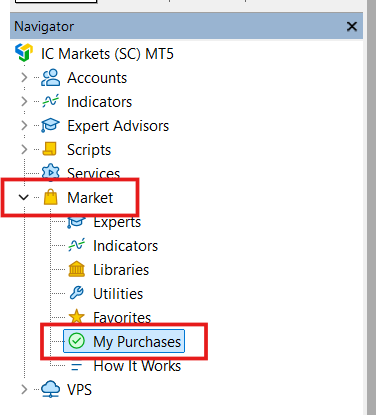
Expert Advisors > Market. Drag it onto a chart of your preferred symbol.
Loading Set Files
Set files are crucial as they contain the optimized configurations for specific risk levels and symbols.
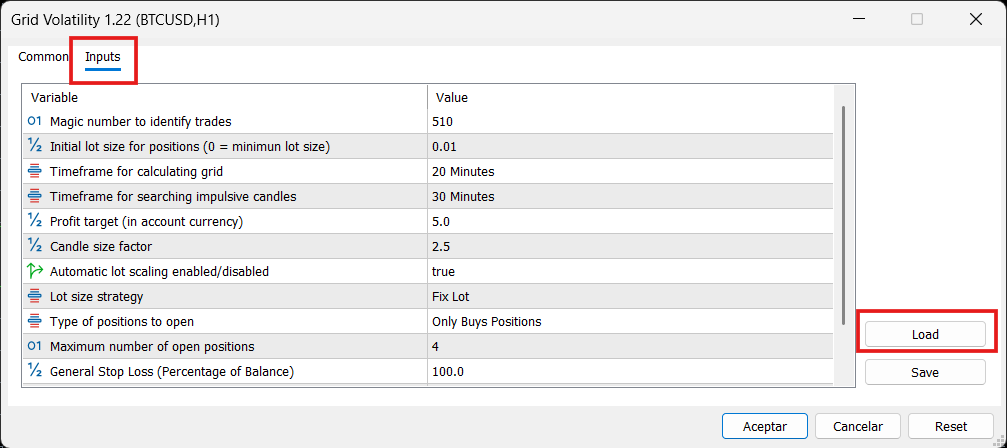
.set file you downloaded from this website.Input Parameters Reference
Below is the complete list of input parameters and their functions.
Optimization Guide
To optimize Grid Volatility professionally in MetaTrader 5, follow this workflow:
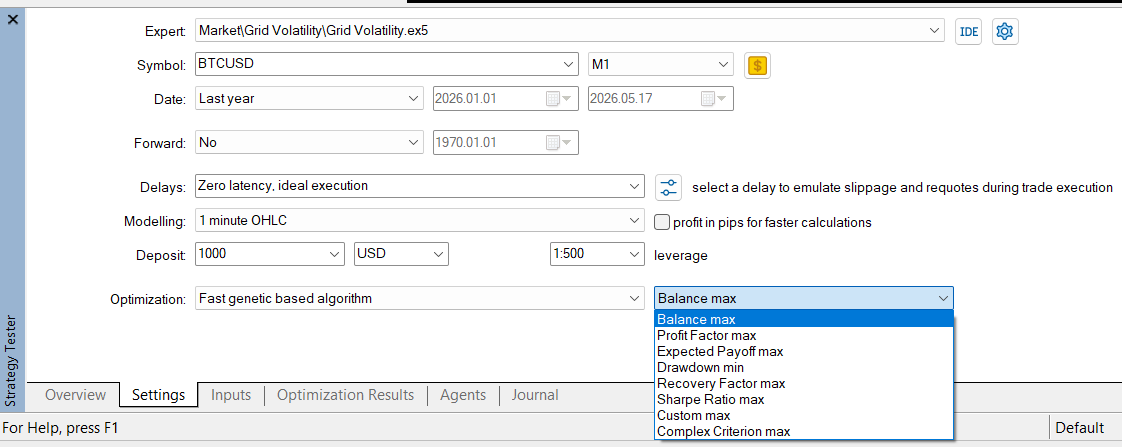
1. Strategy Tester Setup
Ctrl + R in MetaTrader 5 to open the Strategy Tester window.
- Expert: Select
Grid Volatility. - Symbol & Period: Select your preferred asset and set period to 6-12 months.
- Timeframe: Select H1 for visual tracking (The EA engine is multi-timeframe and processes data independently of the chart).
- Modeling: Select "1 Minute OHLC".
- Optimization: Select "Fast genetic based algorithm".
2. Practical Exercise: Optimizing Entry & Profit
Follow these steps in the Inputs tab as an example to learn the workflow. For a real, full optimization, make sure to include all the variables listed in the Recommended Parameters & Ranges table below.
Candle size factor and Profit target (in account currency) and check the box to the left of their names.
- Candle size factor | Start:
0.5| Step:0.5| Stop:5 - Profit target | Start:
0.3| Step:0.1| Stop:0.8
.set file.
3. The "Non-Optimization" Rule: Structural Stabilizers
CRITICAL: Do Not Optimize Structural Parameters
Do not optimize risk parameters such as General Stop Loss (Percentage of Balance) to perfectly fit a historical period. These are structural safety boundaries, not variables designed to curve-fit the past. Only optimize entry thresholds and grid management logic.
4. Recommended Parameters & Ranges
| Input Comment (Visible) | Start | Step | Stop |
|---|---|---|---|
| Timeframe for calculating grid | 5 Minutes | - | 4 Hours |
| Timeframe for searching impulsive candles | 5 Minutes | - | 1 Hour |
| Profit target (in account currency) | 0.3 | 0.1 | 0.8 |
| Candle size factor | 0.5 | 0.5 | 5 |
| Lot size strategy | Fix Lot | - | Martingale Geometric |
| Type of positions to open | Only Buys Positions | - | Both |
Recommendations
- Leverage: Grid systems require significant margin. The higher the leverage your broker provides, the better the EA can manage multiple positions.
- Capital: The minimum required capital is $100 for micro-lot accounts or cent accounts. For standard accounts, $500 - $1,000 is recommended for safety.
- Brokers: Use low-latency brokers with tight spreads like Deriv or IC Markets.
- VPS: It is highly recommended to run this Expert Advisor on a VPS (Virtual Private Server) with low latency to your broker, 24/5 or 24/7.
Risk Management
Grid trading carries inherent risks. The General Stop Loss is your ultimate safety net. Always set it to a percentage you are mathematically and psychologically prepared to lose (e.g., 20% to 30%).
Test all set files on a Demo account before running them on Live funds. Market conditions change, and past performance is not a guarantee of future behavior.