Scalper Deriv - User Guide
Detailed documentation for installation, configuration, and optimization.
Introduction
Scalper Deriv is a professional automated trading system for MetaTrader 5 that perceives the market not as random movements, but as a series of dynamic waves. The algorithm is engineered to analyze the unique characteristics of these waves, identifying high-probability patterns and capitalizing on their momentum and reversals. This professional tool helps traders navigate market volatility with a structured, data-driven approach.
Installation (MQL5 Market)
Tools > Options > Community and log in with your MQL5.com account credentials.
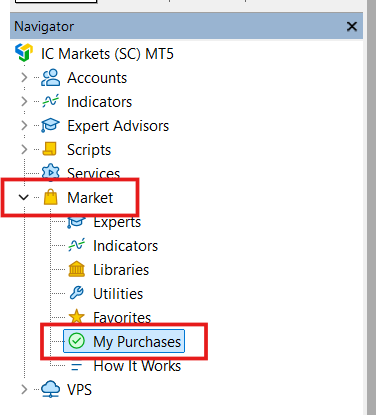
Expert Advisors > Market. Drag it onto an H1 chart.
Loading Set Files
Set files are crucial as they contain the optimized configurations for specific symbols and risk levels.
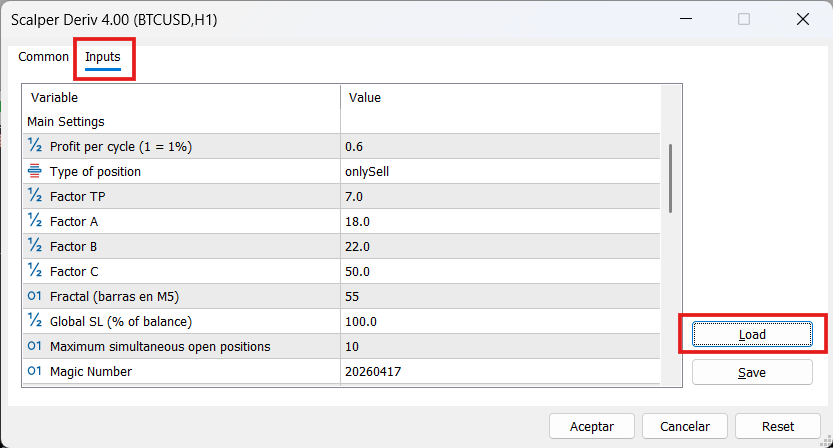
.set file you downloaded from this website.Input Parameters Reference
Below is the complete list of parameters as they appear in the MetaTrader 5 input window. Click on each group to expand or collapse its details.
1. Support & Links
| Parameter (Input Comment) | Description |
|---|---|
| Official product page | Direct link to purchase the Expert Advisor, read verified user reviews, and see the full technical description on the MQL5 Market. |
| Official set files channel | Link to the Telegram channel where optimized .set files are shared monthly. |
| Official updates channel | MQL5 channel for official announcements and new version alerts. |
| Recommended broker | Affiliated links to brokers verified for optimal execution and tight spreads. |
2. Main Settings
| Parameter (Input Comment) | Description |
|---|---|
| Profit per cycle (1 = 1%) | Target profit percentage for the current trading cycle relative to the account balance. |
| Type of position | Trading direction filter: onlyBuy, onlySell, or both. |
| Factor TP | A multiplier used to calculate the Take Profit distance based on average market volatility. |
| Factor A, B, C | Proprietary sensitivity factors that define the entry logic depth. Adjusted via set files for different assets. |
| Fractal (barras en M5) | The lookback period (number of M5 candles) used to identify key price extremes and structure. |
| Global SL (% of balance) | Safety mechanism that closes all trades if the account drawdown reaches this percentage. Example: If your balance is $1,000 and Global SL is set to 20, the EA will close all positions if the total floating loss reaches -$200. |
| Maximum simultaneous open positions | The maximum number of active trades the EA is allowed to manage at once. |
| Magic Number | A unique identifier that allows the EA to distinguish its own trades from those of other EAs or manual operations. It is crucial to use a different Magic Number for each instance of the EA running on different symbols to prevent them from interfering with each other's trade management. |
| Allow new cycles only if no trades are open by others | When enabled, the EA will wait until there are no other active positions (from other EAs or manual trades) on the account before starting a new trading cycle. This ensures the EA operates in a clean environment. |
3. News Filter
| Parameter (Input Comment) | Description |
|---|---|
| Avoid trading during high-impact news | Activates the automatic economic calendar filter to avoid high-volatility events. |
| Block trades X minutes before/after news | The safety time buffer (in minutes) to pause trading around scheduled news events. |
4. Trading Hours & Days
| Parameter (Input Comment) | Description |
|---|---|
| Enable trading only during specified hours | Enables or disables the time-based filter for daily operations. |
| Start / End of trading session (hh:mm) | Defines the operating window. Very useful for avoiding low-liquidity periods. |
| Trade on Monday... Sunday | Individual switches to enable or disable trading for each specific day of the week. |
5. Display
| Parameter (Input Comment) | Description |
|---|---|
| Show on-chart display | Enables or disables the visual dashboard on the MT5 chart. |
| Display colors & Position | Settings to customize the background color, text color, and corner position of the dashboard. |
Optimization Guide
To get the best performance from Scalper Deriv on different symbols, you can use the MT5 Strategy Tester. Optimization is the process of testing multiple variations to see which parameters react best to the current market volatility.
1. Strategy Tester Setup
Ctrl + R in MetaTrader 5 to open the Strategy Tester window.
- Expert: Select
Scalper Deriv. - Symbol & Period: Choose your asset and set period to 6-12 months.
- Timeframe: Select H1 for visual tracking (The EA engine is multi-timeframe and processes data independently of the chart).
- Modeling: Select "1 Minute OHLC".
- Optimization: Select "Fast genetic based algorithm".
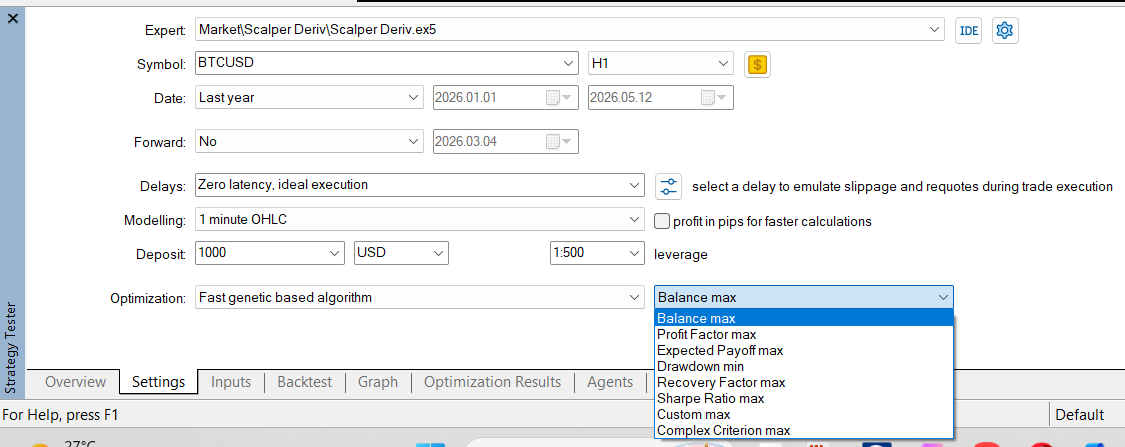
2. Practical Exercise: Optimizing Profit per cycle
Follow these steps in the Inputs tab as an example to learn the workflow. For a real, full optimization, make sure to include all the variables listed in the Recommended Parameters & Ranges table below.
Profit per cycle (1 = 1%) (Internal name: profitPerCycle) and check the box to the left of its name.
- Start:
0.2| Step:0.1| Stop:1.0
.set file.
3. The "Non-Optimization" Rule: Global SL
CRITICAL: Do Not Optimize Global SL
The parameter Global SL (% of balance) (Internal name: generalStopLoss) is your emergency safety net. Do not include this in your optimization runs. Set it manually according to your risk tolerance.
4. Recommended Parameters & Ranges
When you are ready to perform advanced optimizations, use these suggested ranges as a starting point:
| Input Comment (Visible) | Internal Name (MT5) | Start | Step | Stop |
|---|---|---|---|---|
| Factor TP | factorTP | 1 | 1 | 10 |
| Factor A | factorA | 1 | 1 | 30 |
| Factor B | factorB | 1 | 1 | 30 |
| Factor C | factorC | 1 | 1 | 50 |
| Fractal (barras en M5) | fractalMaxMin | 5 | 5 | 60 |
| Profit per cycle (1 = 1%) | profitPerCycle | 0.2 | 0.1 | 1.0 |
Recommendations
- Timeframe: While the EA scans multiple timeframes internally, we recommend keeping it on H1 for consistent monitoring.
- Brokers: Use low-latency brokers with tight spreads like Deriv or IC Markets.
- Demo Practice: Although Scalper Deriv is 100% compatible and intended for real accounts, we strongly recommend a preliminary period on a demo account. This ensures you fully understand the mechanics and risk management before committing real capital.
- VPS: A 24/7 VPS is mandatory for automated trading to avoid downtime.
Risk Management Notice
Always align the risk profile (Low, Medium, High) with your account balance. We highly recommend practicing on a demo account for several weeks to understand the EA's behavior before transitioning to a live account.