
XAU Cipher - User Guide
Detailed documentation for installation, configuration, and optimization.
Introduction
XAU Cipher is an Expert Advisor designed specifically for Gold (XAUUSD), a market known for sharp volatility, impulsive price behavior, and sudden changes in momentum. This EA is not built around random entries or isolated signals. XAU Cipher works as a cycle-based execution engine, where entry, position management, and exit are part of one complete structure. In practical terms, it can be described as a controlled reversal system with progressive position management, adapted to the behavior of Gold and supported by operational filters that help avoid unfavorable trading conditions.
Installation (MQL5 Market)
Tools > Options > Community and log in with your MQL5.com account credentials.
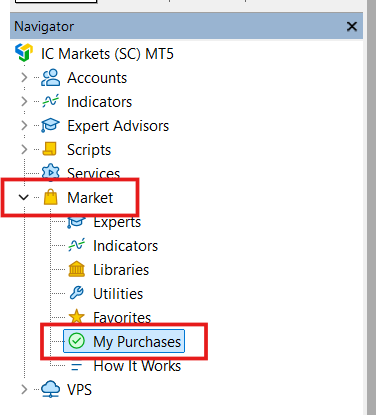
Expert Advisors > Market. Drag it onto an H1 chart of XAUUSD.
Loading Set Files
Set files are crucial as they contain the optimized configurations for specific risk levels.
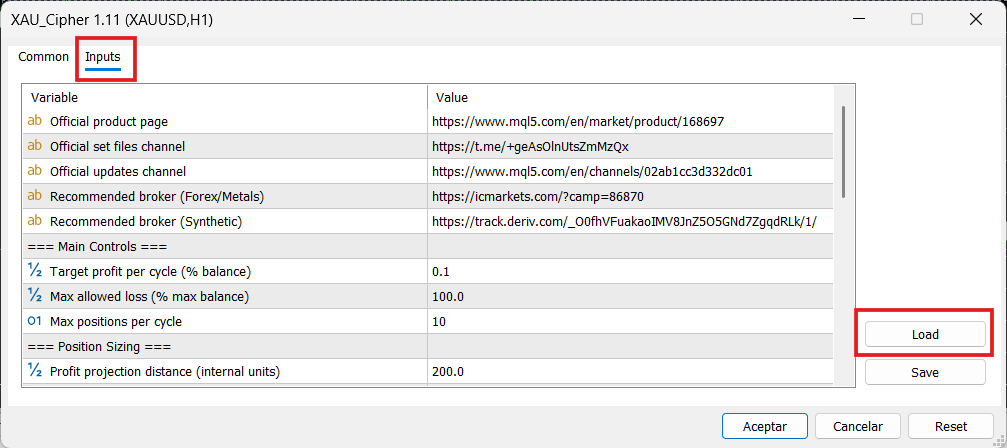
.set file you downloaded from this website.Input Parameters Reference
Below is the complete list of parameters. Click on each group to expand or collapse its details.
Quick Access & Support
| Parameter | Description |
|---|---|
| Official product page | Direct link to purchase the Expert Advisor, read verified user reviews, and see the full technical description on the MQL5 Market. |
| Official set files channel | Link to the Telegram channel where optimized .set files are shared monthly. |
| Official updates channel | MQL5 channel for official announcements and new version alerts. |
| Recommended broker (Forex/Metals) | Affiliated links to brokers verified for optimal execution and tight spreads. |
A. Main Controls
| Parameter | Description |
|---|---|
| Target profit per cycle (% balance) | Defines the profit target the EA will attempt to reach for the entire trading cycle. Increasing this makes the system more aggressive; decreasing it reduces exposure but limits profit per cycle. |
| Max allowed loss (% max balance) | Defines the maximum allowed loss based on the highest account balance reached. It acts as a real risk boundary. If the floating loss reaches this limit, the EA closes the cycle to stop further deterioration. |
| Max positions per cycle | Maximum number of positions the EA can open inside one cycle. Higher values give more room to build recovery but increase exposure. |
B. Position Sizing
| Parameter | Description |
|---|---|
| Profit projection distance (internal units) | Helps project the operational distance used by the system to calculate lot size according to the cycle profit target. Larger values assume wider distance, producing smaller lot sizes (more conservative). |
C. Signal Engine
| Parameter | Description |
|---|---|
| Trading direction | Allows you to define whether the EA will trade BUY ONLY, SELL ONLY, or BOTH directions. |
| Signal timeframe | Timeframe used to evaluate signal conditions. A lower timeframe makes the system more reactive. XAU Cipher is designed to work on M1. |
| Range period | Period used to calculate an average reference of market movement. |
| Entry expansion strength | Measures how strong price expansion must be before the EA considers an entry opportunity. Higher values make it more selective. |
| Wick rejection strength | Determines how clear price rejection must be through wick structure. |
| Recovery strength after expansion | Defines how much recovery price should show after expansion to validate the signal more strongly. |
| Noise tolerance (opposite wick) | Helps filter candles with weak structure or excessive noise on the opposite wick. |
| Volatility threshold (panic) | Defines from which expansion level the market may be considered extreme or panic-like. |
| Recovery strength in panic | Helps evaluate whether, even under extreme conditions, there is still enough recovery to avoid blocking recovery entries. |
| Minimum valid movement | Defines the minimum movement required for a candle or price move to be considered operationally relevant. |
D. Recovery Control
| Parameter | Description |
|---|---|
| Distance to enable recovery (internal units) | Defines the minimum distance price must move away from the last entry before allowing a new position inside the cycle. |
E. Safety Filters
| Parameter | Description |
|---|---|
| Enable news filter | Activates or deactivates the news filter to avoid opening trades during relevant news events. |
| Minutes before news | Minutes before a news event during which the EA will stop opening new trades. |
| Minutes after news | Minutes after a news event during which the EA will continue avoiding new trades. |
| Max allowed spread (internal units) | Defines the maximum spread the EA will accept in order to open new trades. Expressed in internal system units, not broker points. |
F. System Settings
| Parameter | Description |
|---|---|
| Magic number | Unique identifier used by the EA to recognize and manage its own positions. Must be different if running multiple instances. |
Optimization Guide
To optimize XAU Cipher professionally in MetaTrader 5, follow this workflow:
1. Strategy Tester Setup
Ctrl + R in MetaTrader 5 to open the Strategy Tester window.
- Expert: Select
XAU Cipher. - Symbol & Period: Select XAUUSD and set period to 6-12 months.
- Timeframe: Select H1 for visual tracking (The EA engine is multi-timeframe and processes data independently of the chart).
- Modeling: Select "1 Minute OHLC".
- Optimization: Select "Fast genetic based algorithm".
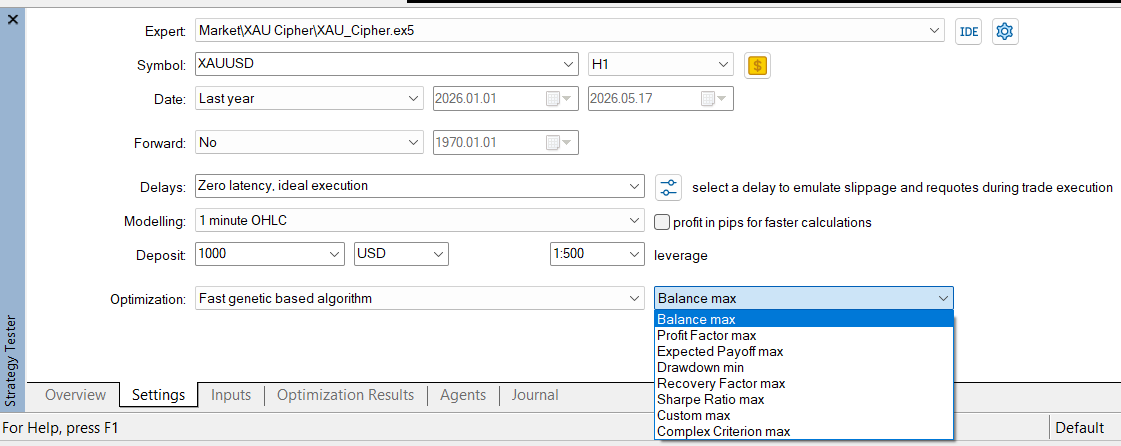
2. Practical Exercise: Optimizing Target profit per cycle
Follow these steps in the Inputs tab as an example to learn the workflow. For a real, full optimization, make sure to include all the variables listed in the Recommended Parameters & Ranges table below.
Target profit per cycle (% balance) (Internal name: Inp_TargetProfitPercent) and check the box to the left of its name.
- Start:
0.10| Step:0.10| Stop:0.80
.set file.
3. The "Non-Optimization" Rule: Structural Stabilizers
CRITICAL: Do Not Optimize Structural Parameters
Some parameters act as structural stabilizers. If optimized too aggressively, they create settings too tightly fitted to historical data. Do NOT optimize aggressively: Volatility threshold (panic), Recovery strength in panic, Noise tolerance, and Minimum valid movement.
4. Recommended Parameters & Ranges
| Input Comment (Visible) | Internal Name (MT5) | Start | Step | Stop |
|---|---|---|---|---|
| Target profit per cycle | Inp_TargetProfitPercent | 0.10 | 0.10 | 0.80 |
| Max positions per cycle | Inp_MaxTradesPerCycle | 4 | 2 | 20 |
| Profit projection distance | Inp_TargetDistance_UBF | 50 | 25 | 300 |
| Entry expansion strength | Inp_ExtensionFactor | 1.20 | 0.20 | 3.00 |
| Wick rejection strength | Inp_WickFactor | 0.80 | 0.20 | 2.00 |
| Recovery strength after expansion | Inp_RecoveryFactor | 0.20 | 0.10 | 0.80 |
| Distance to enable recovery | Inp_RecoveryDistance_UBF | 25 | 25 | 200 |
Recommendations
- Timeframe: Base configuration is designed to work on M1. We recommend using H1 for better tracking and visualization.
- Brokers: Use low-latency brokers with tight spreads like Deriv or IC Markets.
- Professional Criteria: When optimizing, do not just pick the highest profit. Prioritize reasonable drawdown, stable equity curves, and a sufficient number of trades.
- VPS: A 24/7 VPS is mandatory for automated trading to avoid downtime.
Risk Management & Expectations
XAU Cipher is a trading tool, not a profit guarantee. Gold can enter highly directional or extremely volatile phases. Start on demo or with reduced risk, optimize with discipline, and do not treat a strong backtest as a future guarantee.